Features
- New PDF engine: 25% smaller PDFs, sharper text in
scans, more types of PDFs supported
- Language: Clop can be translated into any language
with the free Limba app, from Settings > General

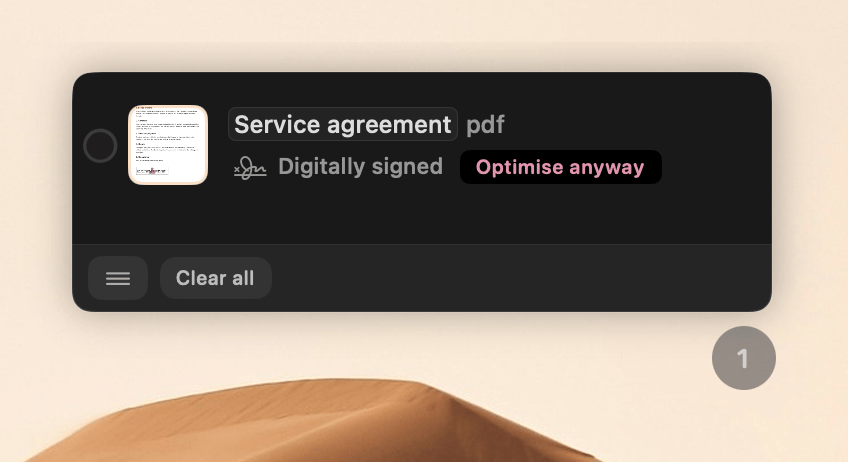
- Signed PDFs are left unchanged, since optimising
them invalidates the digital signature. Use Optimise
anyway on the result when the signature doesn't matter.

- Signed PDFs in pipelines can be optimised anyway
with a new toggle on PDF pipelines

- CLI stuff:
--optimise-signed-pdfs,
--crop-signed-pdfs and --uncrop-signed-pdfs,
with the same options in the MCP server and in Shortcuts
- Force option for
clop optimise and
clop pipeline run (-f) to process files that
Clop already optimised
Fixes
- Fixed a possible freeze when optimising many large images at
once
- Fixed a possible freeze when switching apps
- Fixed a possible freeze at launch when the disk is slow to
answer
- Fixed a possible freeze when many files change at once in a watched
folder
- Fix the checkout window not opening on macOS 15 and older, and a
possible crash on Intel Macs when opening it
- Fix
clop optimise reporting a failure for a screenshot
that was already optimised from the clipboard
- Fix PDF pipelines with their own
optimise step leaving
the PDF unoptimised
- Fix blurry figures in PDFs optimised at the Adaptive
resolution
- Fix the
targetSize pipeline step failing on videos
above 30 fps
- Show an error when a pipeline step fails, instead of no
change
- Fix stripping metadata from some Xiaomi HEIC photos
Improvements
- Clop recognises files it already optimised about 15 times
faster
- JPEG XL conversions are a bit smaller and faster
- Pipelines that start with
optimise skip the standard
optimisation before it, instead of optimising the file twice